New · made for macOS Tahoe
Every app gets
its own volume.
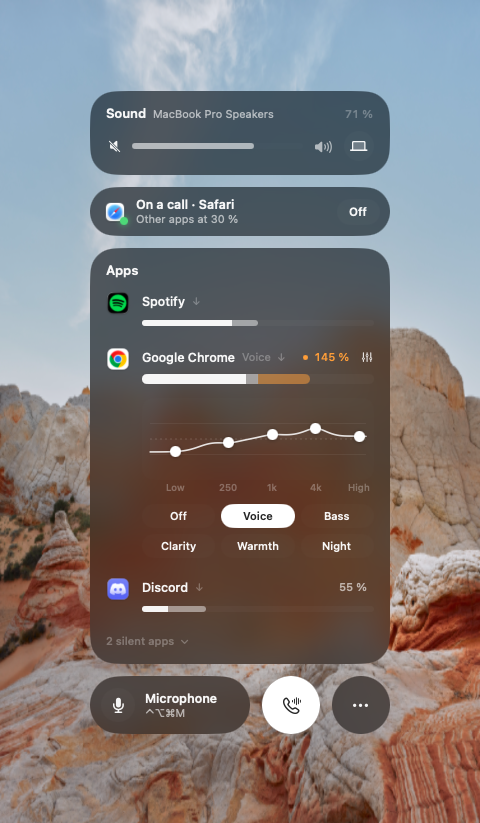
Turn the music down and the call up. Boost a quiet video to 200 %. Give every app its own EQ. HelloTune lives in your menu bar and stays silent until you need it.
7 days free · one-time purchase · macOS 14.2+ · Apple silicon & Intel
↑ Drag a slider. Press the phone to start a call.
Features
The mixer your Mac forgot.
A slider for every app
Helper processes are grouped, so Chrome is one row, not twelve. Settings are remembered per app.
Boost to 200 %
Quiet call or video? Push it past 100 %. A look-ahead limiter keeps it clean instead of distorted.
Live levels
Every slider breathes with the sound, so you instantly see which app is making noise.
Solo & per-app output
Hear just one app, or send your call to the headphones while music stays on the speakers.
Volume keys for displays
HDMI and DisplayPort monitors finally get working volume keys and a native-looking HUD.
Device rules
Rank your speakers and mics, keep AirPods in high quality during calls, never auto-switch to that monitor.
Equalizer
An EQ for each app.
Make voices clearer in calls and podcasts, give music more low end, or turn the bass down at night — without touching other apps. Five bands, drag the curve or pick a preset.
Calls
Calls that sound like calls.
Music ducks during calls
When Zoom, Teams, Meet, FaceTime, Slack or Discord use the mic, other apps fade to 30 % and come back afterwards.
AirPods stay in high quality
HelloTune keeps your Mac’s microphone active, so music doesn’t drop to muffled 16 kHz call mode.
One key mutes every mic
⌃⌥⌘M mutes all microphones — even the one an app picked itself — and restores them exactly.
Your audio never leaves your Mac.
To change an app’s volume, macOS asks you to let HelloTune “record” system audio. HelloTune only adjusts it live — it never records, saves or sends a single sample. No account, no tracking, no analytics. Built on Apple’s own audio APIs: no drivers, no restart.
Pricing
Pay once. Keep it.
- Volume, mute & solo for every app
- Boost to 200 % with limiter
- Per-app EQ with presets
- Per-app output device
- Call ducking & mic mute
- Volume keys for displays
- Device rules & AirPods quality
- Free updates
macOS 14.2 or later · Apple silicon & Intel · Signed & notarized by Apple. Secure checkout by Polar — your license key appears right after paying and arrives by email.
FAQ